

 Post by
Every piece of software you interact with, whether it is a mobile banking app, a project management tool, or an e-commerce platform, was built using some form of a software development system. Understanding what these systems are, how they differ, and when to use each one is not just useful for developers. It is essential knowledge for founders, product managers, and business leaders who are making real decisions about how their technology gets built. This guide walks through the core types of software development systems in plain language, so you can make informed choices without needing a computer science degree.
What Is a Software Development System and Why the Definition Matters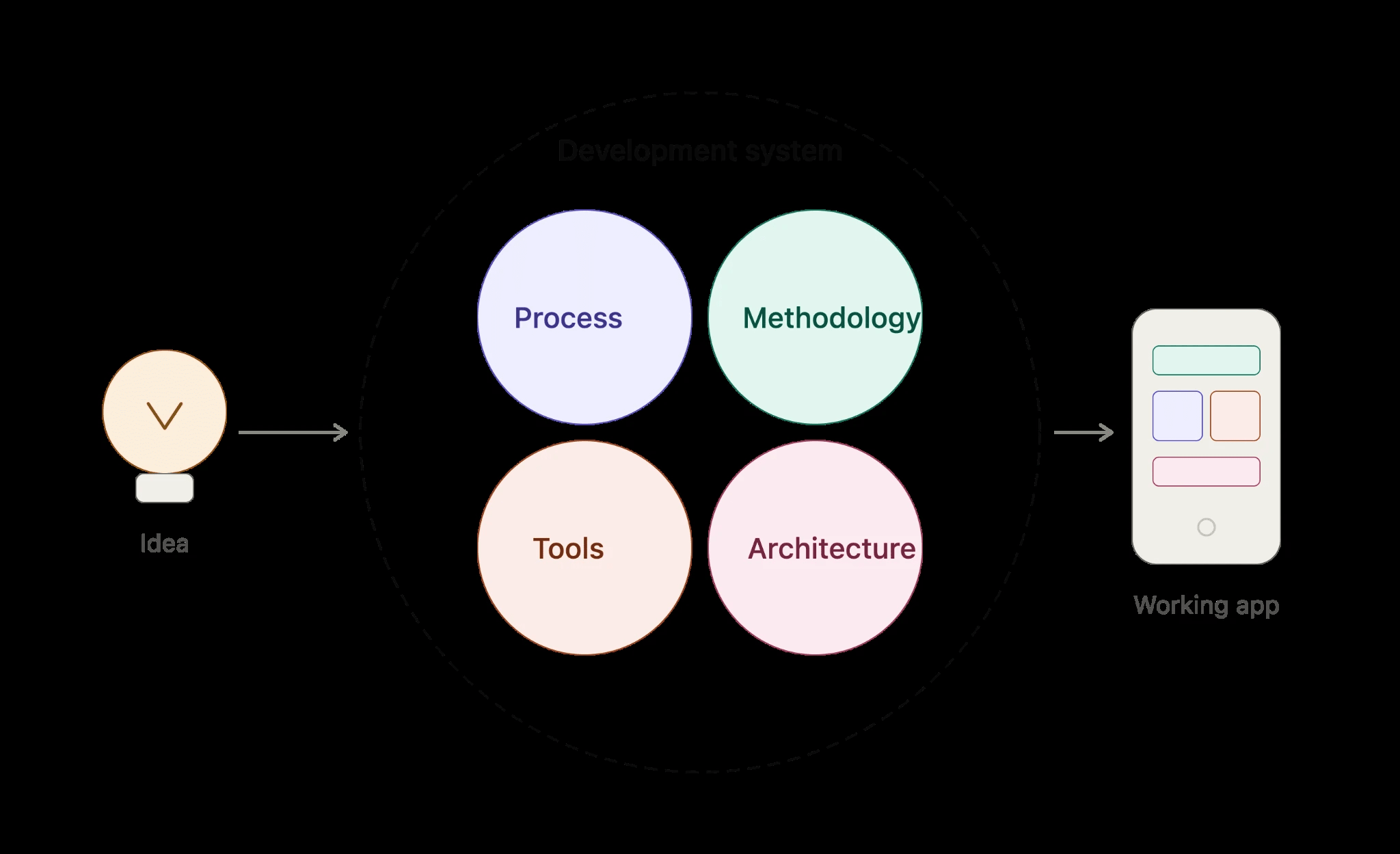
A software development system is the structured combination of processes, methodologies, tools, and architectural patterns that a team uses to plan, build, test, and deliver software. It is not just a framework or a programming language. It is the entire operating model that determines how a product goes from an idea to a working application in the hands of real users.
The definition matters more than most people realize because the system you choose shapes almost everything downstream. It affects how fast your team can ship features, how easily the codebase can grow, how bugs get caught, and how much it costs to maintain the product over time. Two teams could use the same programming language and still produce wildly different outcomes based entirely on the development system guiding their work.
When businesses skip this step and jump straight into writing code without a clear system in place, they typically end up with technical debt, missed deadlines, and software that is difficult to scale. Defining your development system upfront is one of the highest-leverage decisions you can make at the start of a project.
It is also worth separating two concepts that often get blurred together. A software development methodology, such as Agile or Waterfall, describes how a team organizes its workflow and communication. A software development system is broader and includes the architecture, deployment model, tooling, and the methodology all working together. Both matter, and both are discussed in this guide.
To understand Software Development Systems: Types & How They Work, it helps to compare what you see in the data and what action you need to take next.
The 6 Main Types of Software Development Systems Explained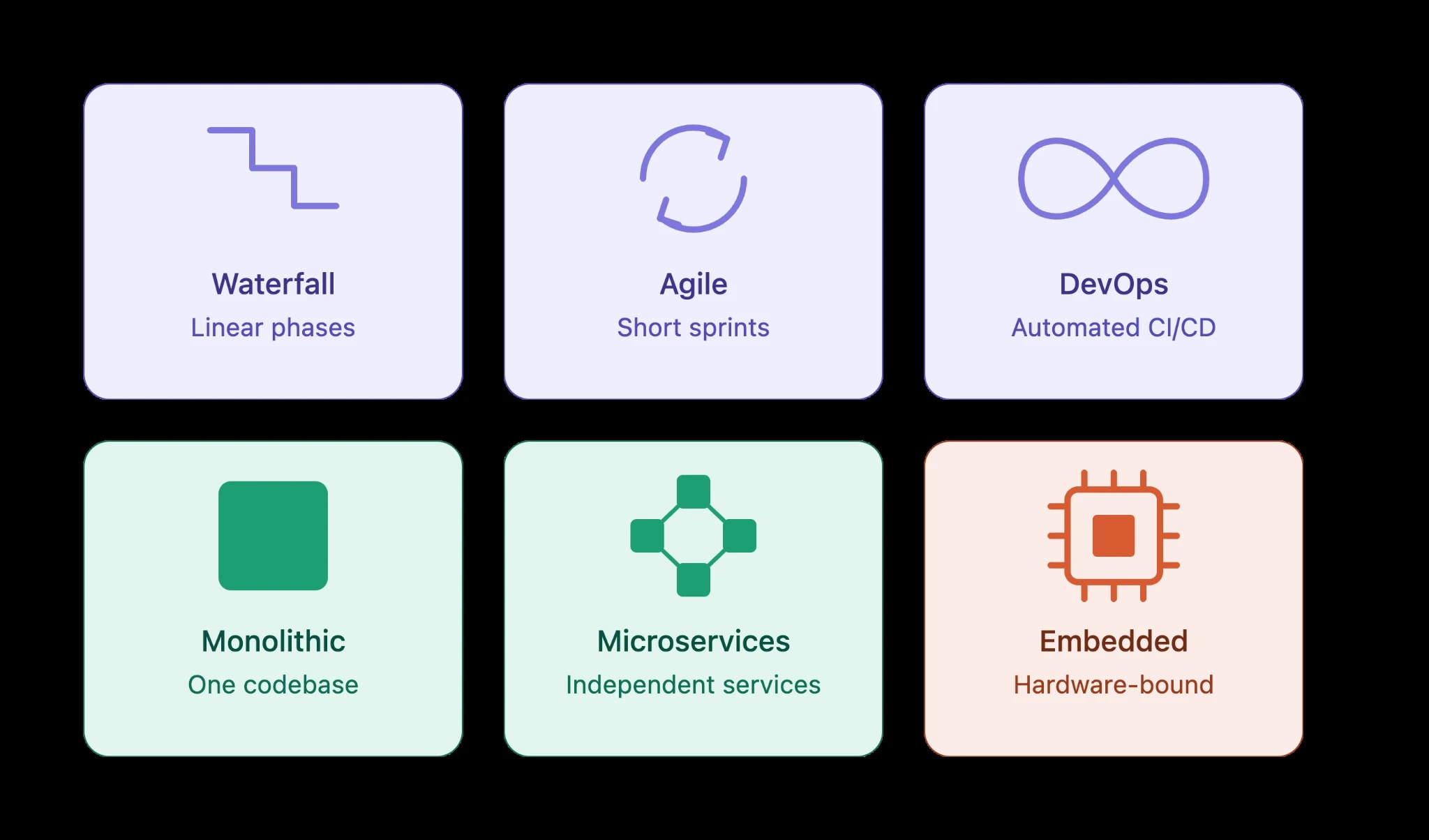
Not all software is built the same way. Depending on the product’s purpose, audience, scale, and business model, different development systems are better suited to different situations. Below are the six main types you will encounter across the industry, along with a clear explanation of how each one works and where it fits best.
1. Waterfall Development Systems
Waterfall is the oldest and most linear approach to building software. Work moves through fixed phases in sequence, including requirements gathering, system design, implementation, testing, and deployment, with each phase completed before the next begins. It works well for projects where requirements are clearly defined from the start and are unlikely to change, such as government contracts or embedded systems with strict compliance requirements. The main drawback is inflexibility. If a requirement changes midway through, going back is costly and time-consuming.
2. Agile Development Systems
Agile breaks development into short, repeatable cycles called sprints, typically lasting one to four weeks. Teams build, test, and review working software continuously, adapting to feedback at each stage. This system is widely used for web applications, SaaS products, and mobile apps where user needs evolve. Agile reduces risk by catching problems early and keeps stakeholders closely involved throughout the process. It requires strong communication and discipline, but the payoff is faster delivery and a product that stays aligned with real user needs.
3. DevOps Development Systems
DevOps is not just a methodology; it is a cultural and technical system that merges software development and IT operations into a single continuous workflow. Teams use automation tools to handle testing, integration, and deployment so that new code can move from a developer’s machine to production quickly and reliably. DevOps systems rely heavily on continuous integration and continuous delivery pipelines, often abbreviated as CI/CD. This approach is especially valuable for teams releasing frequent updates, managing cloud infrastructure, or operating at scale where manual deployment processes would create bottlenecks.
4. Monolithic Architecture Systems
In a monolithic system, the entire application is built as a single unified codebase. All components- the user interface, business logic, and data access layer- are tightly coupled and deployed together. Monolithic systems are simpler to develop initially and work well for smaller applications or early-stage startups that need to move quickly. The challenge comes at scale. As the application grows, the codebase becomes harder to maintain, and deploying a small update requires redeploying the entire system, which increases risk and slows down teams over time.
5. Microservices Architecture Systems
Microservices break an application into small, independently deployable services, each responsible for a specific business function. For example, a SaaS platform might have separate services for user authentication, billing, notifications, and analytics. Each service runs independently, communicates through APIs, and can be updated or scaled without touching the rest of the system. This model is used by large-scale applications that need flexibility and reliability. It introduces more operational complexity upfront but gives engineering teams the ability to work on different parts of the system in parallel without stepping on each other.
6. Embedded and Real-Time Development Systems
Embedded systems are software built to run on specific hardware, such as medical devices, automotive control systems, industrial machinery, or consumer electronics like smart thermostats. Real-time development systems extend this concept to applications where timing is critical, and delays are not acceptable, such as flight control software or financial trading systems. These systems are typically built with languages like C or C++ and require deep knowledge of hardware constraints, power consumption, and performance optimization. They are highly specialized and operate under requirements that standard web or mobile development systems are not designed to handle.
How Software Development Systems Actually Work: The Build-to-Deploy Flow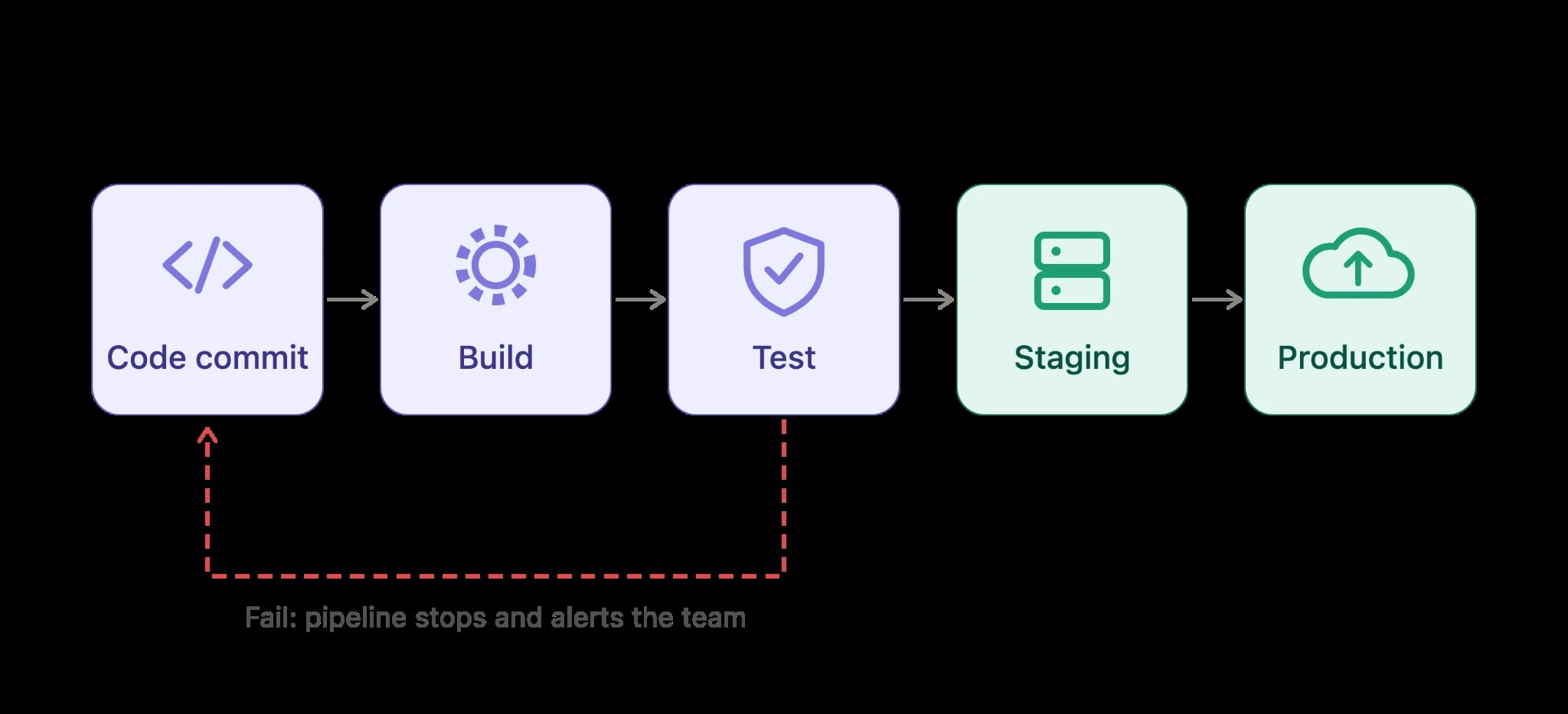
Every software development system, regardless of its type, follows a structured flow that takes code from a developer’s local machine to a live production environment. The process starts with version control, where developers commit code changes to a shared repository. From there, automated pipelines pick up those changes, run tests, compile or bundle the application, and push the output through staging and production environments. What differs between system types is not the general concept but the tooling, timing, and degree of automation applied at each stage.
In a continuous integration and continuous delivery setup, every code commit triggers an automated sequence. The pipeline runs unit tests, integration tests, static analysis, and security scans before anything moves forward. If any check fails, the pipeline stops and alerts the team immediately. This tight feedback loop is what makes modern development systems so effective at catching bugs early, before they compound into expensive production incidents. Teams using mature CI/CD pipelines typically fix defects in hours rather than days, simply because the system surfaces problems at the moment they are introduced.
The deployment stage itself varies widely depending on infrastructure choices. Container-based systems package application code with its dependencies into portable images, which orchestration platforms then schedule and run across clusters of servers. Serverless systems skip the container management entirely and let the cloud provider handle execution. Monolithic systems deploy as a single compiled artifact to one or more servers. Understanding where your deployment lands in this spectrum matters because it directly affects how fast you can ship updates, how much you pay for infrastructure, and how much operational overhead your team carries. Here is a simplified view of how the flow compares across common system architectures:
| Stage | Monolithic System | Microservices System | Serverless System |
|---|---|---|---|
| Code commit | Single repo trigger | Per-service repo trigger | Function-level trigger |
| Build time | Longer, full rebuild | Faster, isolated service | Near-instant, function scope |
| Test scope | Full application suite | Service plus contract tests | Function unit tests |
| Deployment unit | Single artifact | Container image per service | Individual function bundle |
| Rollback speed | Moderate | Fast, per-service | Very fast |
How to Choose the Right Software Development System for Your Project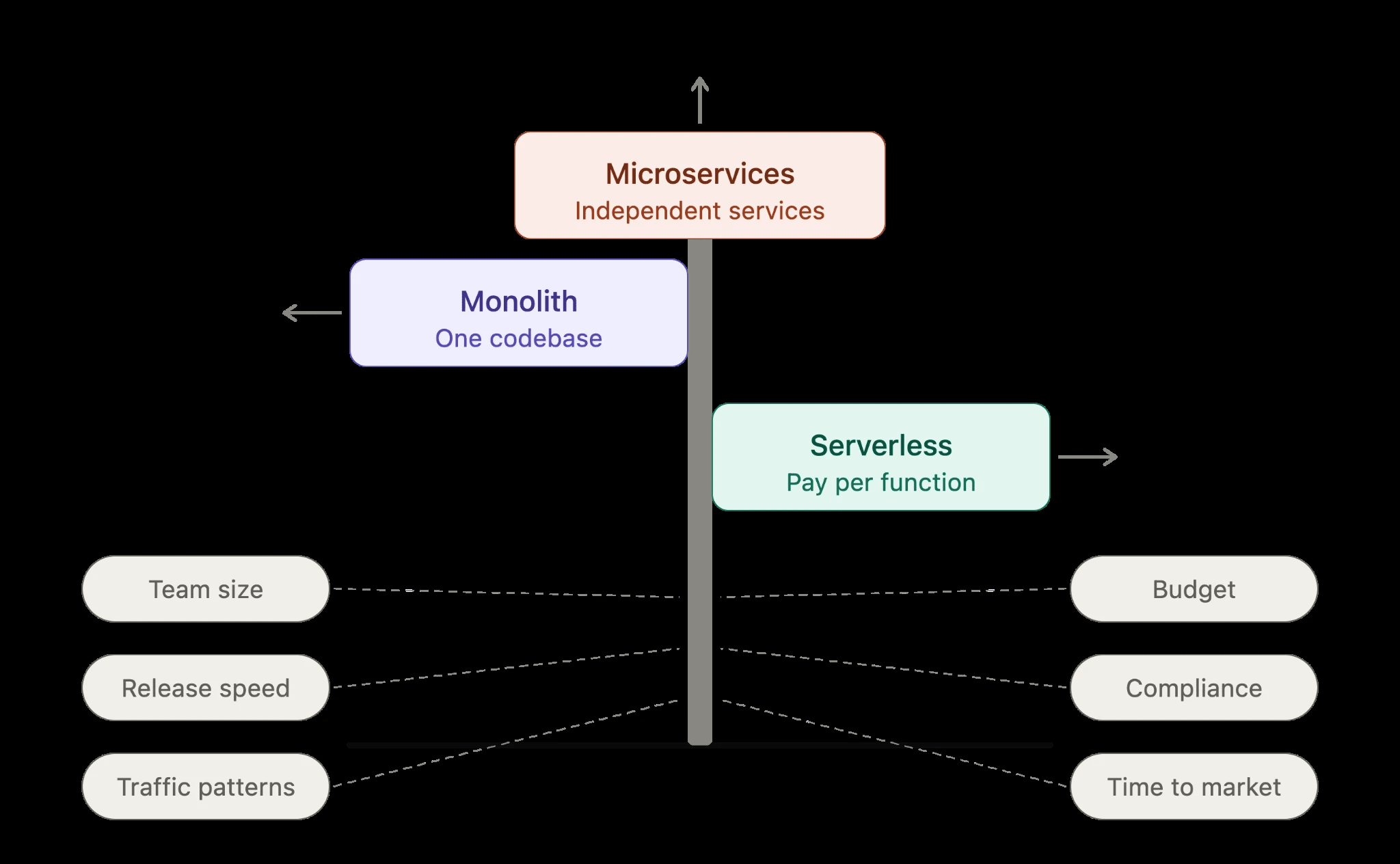
Choosing a software development system is not purely a technical decision. It is a business decision that depends on your team size, your release cadence, your budget for infrastructure, and how much complexity you can realistically manage day-to-day. A five-person startup building a SaaS product needs a very different system from a fifty-person engineering team maintaining multiple interconnected services for enterprise clients. Getting this alignment wrong is one of the most common reasons projects run over budget or stall in the scaling phase.
The most useful starting point is to audit your current and near-future requirements honestly. Ask how frequently you need to ship updates, whether different parts of your application scale independently, and how much infrastructure expertise your team has in-house. Early-stage products almost always benefit from starting with a simpler, more unified system and migrating toward distributed architectures only when growth genuinely demands it. Premature architectural complexity costs time and money that most early-stage teams simply cannot afford.
Use the following criteria as a practical decision filter when evaluating your options:
- Team size and expertise: Smaller teams do better with systems that minimize operational overhead. Microservices and Kubernetes-based systems need dedicated DevOps experience to run well.
- Release frequency: If you ship multiple times a week, you need robust CI/CD pipelines and automated testing built into your system from day one.
- Traffic patterns: Spiky or unpredictable traffic favors serverless or auto-scaling container systems. Steady, predictable workloads are well-served by traditional server-based setups.
- Budget constraints: Serverless systems can be very cost-efficient at low traffic but expensive at scale. Containers offer more cost predictability for sustained workloads.
- Compliance requirements: Heavily regulated industries may require on-premises or private cloud deployments, which limits your system choices significantly.
- Time to market: If speed is the priority, choose the system your team already knows well rather than adopting unfamiliar tooling under pressure.
Common Mistakes Teams Make When Setting Up Software Development Systems
One of the most frequent mistakes is building a system that is far more complex than the project actually needs. Teams read about microservices or event-driven architectures and adopt them before the product even has a stable user base. The result is a fragile network of services that is difficult to debug, expensive to maintain, and slow to change. Complexity should be introduced in response to real, demonstrated problems, not anticipated ones. A well-structured monolith that ships reliably will outperform an over-engineered distributed system that takes three engineers to keep running.
Another mistake is treating automation as optional. Many teams set up version control and call it a day, then handle testing, builds, and deployments manually. This works fine initially but breaks down quickly as the team grows or the release pace increases. Manual deployment processes are inconsistent, error-prone, and slow. Investing in a proper CI/CD pipeline early, even a simple one, pays significant dividends within the first few months of a project. The teams that delay this investment almost always wish they had done it sooner.
Environment inconsistency is a subtler but equally damaging problem. When a developer’s local setup does not match the staging or production environment, bugs appear in production that nobody could reproduce earlier. This is typically caused by differences in operating system configurations, dependency versions, or environment variables across environments. Common setup mistakes to watch for include:
- Not containerizing local development environments, leading to “works on my machine” failures in production.on
- Storing secrets or configuration values directly in code instead of using environment-specific secret management
- Skipping staging environments entirely and testing directly in production
- Using different database engines locally and in production, which masks compatibility issues
- Neglecting to version infrastructure configuration, making it impossible to reproduce or audit environment states
- Letting technical debt accumulate in the pipeline itself, with outdated dependencies and no-longer-relevant test suites slowing every build
Scaling Your Software Development System as Your Team Grows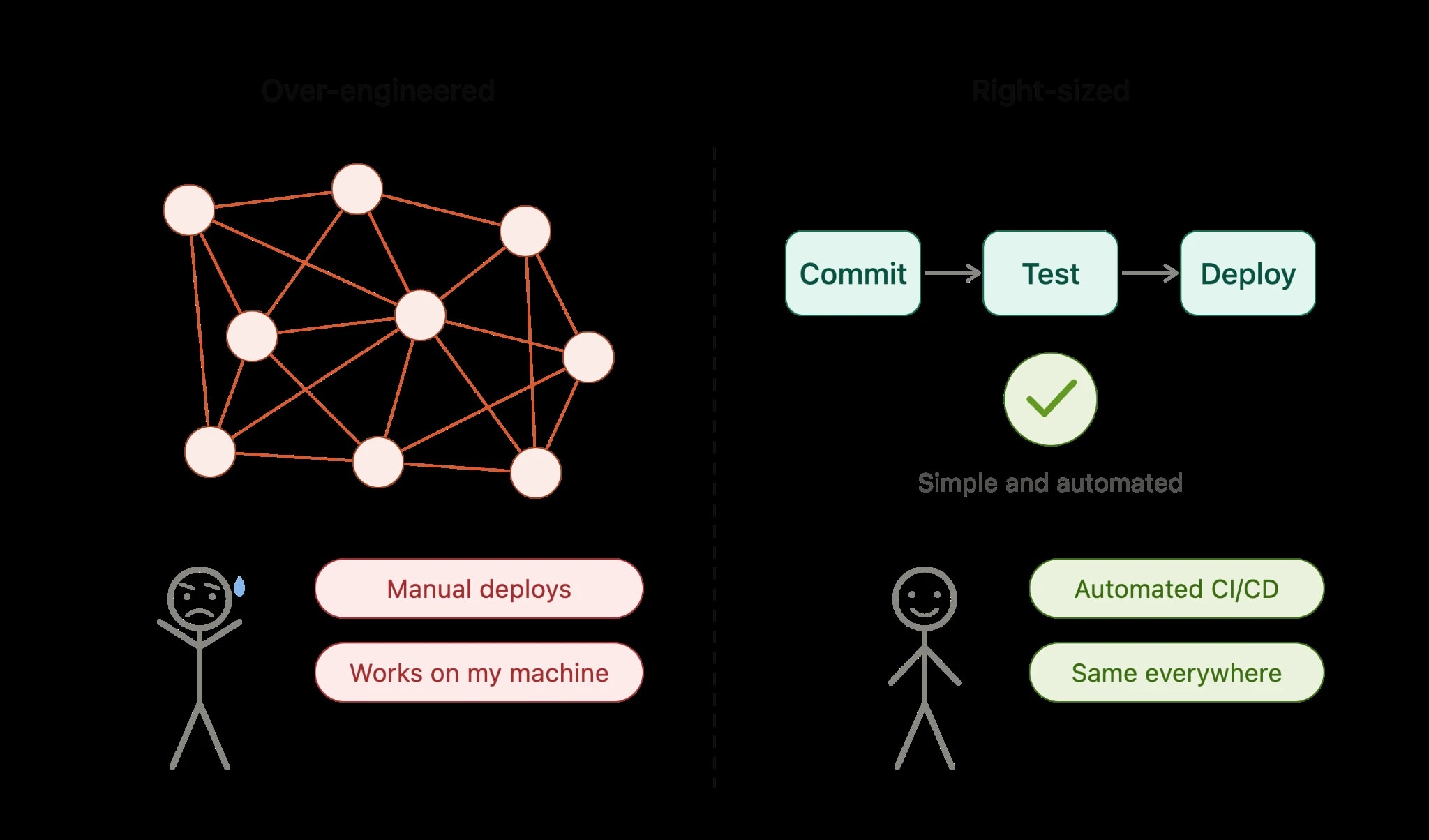
A setup that works perfectly for a two-person team will start showing cracks the moment you add five more developers, a QA engineer, and a product manager. Scaling a software development system is not just about adding more servers or buying more licenses. It requires rethinking workflows, permissions, automation coverage, and how different environments talk to each other.
The good news is that most scaling problems follow predictable patterns. If you know what to watch for early, you can restructure before the cracks become full breaks.
Here are the most common scaling signals teams encounter, and how to address each one:
- Merge conflicts pile up daily: This usually means your branching strategy is too loose. Switching to trunk-based development with short-lived feature branches reduces integration pain significantly.
- Build times creep past 20 minutes: Long CI pipelines kill developer momentum. Introduce parallel test execution, caching strategies, and selective test runs based on changed files.
- Environment drift between staging and production: Containerization with Docker and infrastructure-as-code tools like Terraform help enforce consistency across all environments.
- Unclear ownership over modules or services: As codebases grow, introducing a monorepo structure with clearly defined ownership boundaries, or migrating to microservices, prevents stepping on each other’s work.
- Onboarding new developers takes weeks: A well-documented local development setup, seed data scripts, and automated environment provisioning cut onboarding time dramatically.
- Security reviews become bottlenecks: Shift security left by integrating static analysis and dependency scanning directly into the CI pipeline so issues surface before code review, not after.
Scaling is an ongoing process rather than a single migration event. Teams that treat their development system as a product, iterating on it regularly, sustain velocity far better than those who set it up once and forget it.
Real-World Examples of Software Development Systems in Action
Abstract concepts land better when grounded in concrete scenarios. The following examples illustrate how different project types map to different system configurations, and why those choices produce better outcomes than one-size-fits-all approaches.
Early-Stage SaaS Startup
A founding team of three building a B2B SaaS product needs speed above everything else. They typically adopt a monolithic architecture initially, deploy to a single cloud provider, and use a lightweight CI/CD pipeline with GitHub Actions. The focus is shipping features and getting user feedback, not perfecting infrastructure. This is the right call. Over-engineering at this stage wastes runway.
Mid-Size E-Commerce Platform
A platform processing thousands of daily orders needs reliability, staging parity, and rollback capability. Here, a more structured system emerges: separate development, staging, and production environments, automated database migrations, feature flags for safe releases, and monitoring dashboards tied to business metrics like checkout completion rates, not just uptime.
Enterprise Internal Tool
A large organization building internal software faces a different set of constraints: compliance requirements, Active Directory integration, change approval boards, and audit trails. Their development system prioritizes access controls, documented deployment approvals, and integration with ticketing systems like Jira for traceability.
| Project Type | Top Priority | Key System Features | Common Risk |
|---|---|---|---|
| Early SaaS Startup | Speed to market | Simple CI/CD, monolith, one environment | Technical debt accumulation |
| E-Commerce Platform | Reliability and safe releases | Feature flags, staging parity, rollback | Environment drift |
| Enterprise Internal Tool | Compliance and traceability | Approval workflows, audit logs, RBAC | Slow release cycles |
| Mobile App with Backend API | API versioning and stability | Versioned endpoints, contract testing | Breaking changes on live clients |
Tools That Power Modern Software Development Systems
Choosing the right tools does not guarantee a good system, but choosing the wrong ones almost guarantees a painful one. The tools you pick should fit your team’s size, skill set, and deployment complexity rather than simply following what is trending in developer forums.
Below is a breakdown of the core tool categories and what to consider within each:
- Version control: Git is the standard. The choice is really about hosting, whether GitHub, GitLab, or Bitbucket, and each offers different CI/CD integration depths and access control models.
- CI/CD platforms: GitHub Actions works well for teams already on GitHub and wanting simplicity. GitLab CI offers tighter integration if you self-host. Jenkins remains popular in enterprise environments where customization outweighs setup cost.
- Containerization: Docker is effectively the baseline for consistent environment management. Kubernetes handles orchestration at scale, but adds significant operational complexity that smaller teams rarely need early on.
- Infrastructure as code: Terraform is the most widely adopted option for managing cloud infrastructure declaratively. It reduces manual configuration errors and makes infrastructure reviewable in pull requests.
- Monitoring and observability: Tools in this space cover three pillars: logs, metrics, and traces. Picking a platform that consolidates all three reduces context switching when diagnosing production issues.
- Project and issue tracking: Linear has gained popularity with product teams for its speed and clean interface. Jira remains dominant in larger organizations where workflow customization and reporting matter most.
The right question is not which tool is best in isolation, but which combination fits together without creating unnecessary friction. Every tool that requires manual syncing with another tool is a future source of errors.
Conclusion
Software development systems are not background infrastructure you set up once and ignore. They shape how fast your team moves, how safely you ship, and how well your product holds up under real-world conditions. Understanding the types of systems available, how they fit together from code commit to production deployment, and how to match the right system to your project stage gives you a genuine advantage over teams that treat tooling as an afterthought. The difference between a team that ships confidently every week and one that dreads every release often comes down to whether their development system is working for them or against them.
If you are building a new product, scaling an existing one, or trying to untangle a development process that has grown messy over time, getting the system architecture right is worth the investment. At Techlad, we help startups and growing businesses design and build software development systems that match their actual needs, not just what sounds impressive on paper. Whether you need a simple, fast setup to validate an idea or a production-grade pipeline to support a scaling team, the right system makes every piece of the work more reliable.
Frequently Asked Questions
What is the difference between a software development system and a software development methodology?
A methodology like Agile or Scrum describes how a team plans and organizes work. A software development system is the technical infrastructure that supports that work, covering version control, CI/CD pipelines, environments, and deployment tools. The two work together but serve different purposes.
How many environments does a typical software development system need?
Most production-grade projects use at least three environments: development, staging, and production. Larger teams sometimes add a QA environment or ephemeral preview environments for individual pull requests. The right number depends on team size, release frequency, and how much testing happens before deployment.
Can a small team or solo developer benefit from setting up a proper development system?
Yes, even solo developers benefit from automated testing, a clear branching strategy, and a consistent deployment process. These practices prevent costly mistakes, make it easier to onboard collaborators later, and reduce the mental load of tracking what is deployed where across different environments.
How often should a team review and update their software development system?
A lightweight review every quarter works well for most teams. Triggers for more urgent reviews include onboarding new team members, shipping a major product change, experiencing repeated production incidents, or noticing that build and deployment times have significantly increased over previous benchmarks.
What is the most common sign that a software development system needs restructuring?
The clearest signal is when deployments become stressful events rather than routine ones. If your team avoids releasing on Fridays, manual steps are required to push code, or rollbacks are difficult, the system is working against you and needs to be redesigned before the problems compound further.