

 Post by
 Developer productivity is no longer just about typing speed or knowing the right shortcuts. In 2027, the tools your engineering team uses directly shape how fast you can build, test, and ship software, and the gap between well-tooled teams and poorly-tooled ones has never been wider. Whether you are building a SaaS product, a custom web application, or an internal platform, picking the right productivity tools is one of the highest-leverage decisions you can make for your team.
Why Productivity Tooling Has Changed So Much for Developers in 2027
A few years ago, most developer productivity conversations centered on editor preferences, CI/CD pipelines, and which project management board to use. Those things still matter, but the conversation has shifted significantly. The biggest driver of change is the maturation of AI tooling inside the development workflow itself, followed closely by the normalization of distributed and asynchronous engineering teams spread across multiple time zones.
Remote-first development became the norm rather than the exception, which forced tooling companies to rethink collaboration at a deeper level. Code review, documentation, onboarding, and even debugging are now designed around async workflows. At the same time, the sheer complexity of modern software stacks, microservices, multi-cloud deployments, complex API integrations, and frontend frameworks that update every six months, has made cognitive load management a real engineering concern.
What this means practically is that productivity tools in 2027 are less about tracking hours and more about reducing friction at every stage of the development lifecycle. The best tools eliminate context switching, surface the right information at the right time, automate repetitive decisions, and help developers stay in a state of focused, high-output work for longer stretches. Teams that have adopted this newer generation of tooling consistently report faster cycle times, fewer production bugs, and better morale among their engineers.
To understand Best Software Development Productivity Tools in 2027, it helps to compare what you see in the data and what action you need to take next.
Check out our latest blog on Greenfield Software Development vs Brownfield Explained
AI-Powered Coding Assistants: The Biggest Productivity Shift in Years
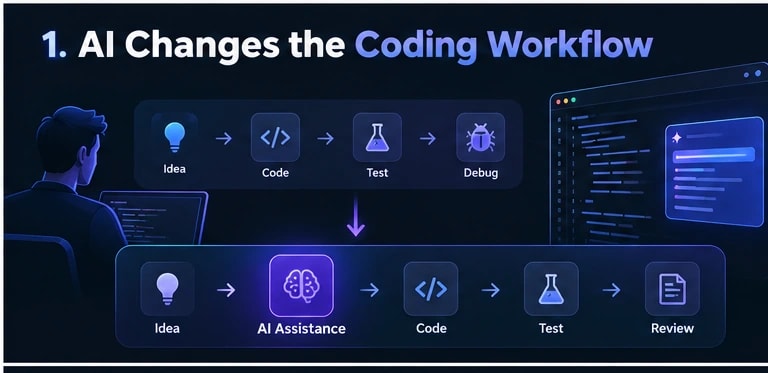
If there is one category of tooling that has genuinely reshaped how developers work day to day, it is AI-powered coding assistants. These tools have moved well beyond simple autocomplete. In 2027, the best coding assistants can understand context across an entire codebase, suggest architectural patterns, write and explain tests, flag security vulnerabilities as you type, and even propose refactoring strategies based on your existing code style.
The most capable assistants now integrate directly into the IDE and are trained on both general programming knowledge and, increasingly, your team’s specific codebase and coding conventions. This means a junior developer on your team gets suggestions that align with how your senior engineers actually write code, which dramatically reduces review cycles and back-and-forth in pull requests.
What matters when evaluating a coding assistant in 2027 is not just raw suggestion accuracy but context window size, codebase indexing depth, and how well the tool integrates with your existing stack. Some assistants are better suited to backend Python or Go work, while others excel in TypeScript and React environments. If your team works across multiple languages and frameworks, look for tools with strong multi-language support and the ability to switch context without degrading suggestion quality.
Privacy and security are also a serious consideration, especially for teams building SaaS products that handle sensitive customer data. Many engineering teams now require on-premise or private cloud deployments of their coding assistants, so that proprietary source code never leaves their infrastructure. This has become a standard procurement question, not an afterthought.
The productivity gains from well-implemented coding assistants are measurable. Teams that integrate these tools thoughtfully, with proper onboarding and clear guidelines on when to trust and when to verify suggestions, consistently see meaningful reductions in time spent on boilerplate code, documentation, and initial test coverage. The key word is thoughtfully. Dropping a coding assistant into a workflow without context or guardrails produces noise, not speed.
Project and Task Management Tools Built for Engineering Teams
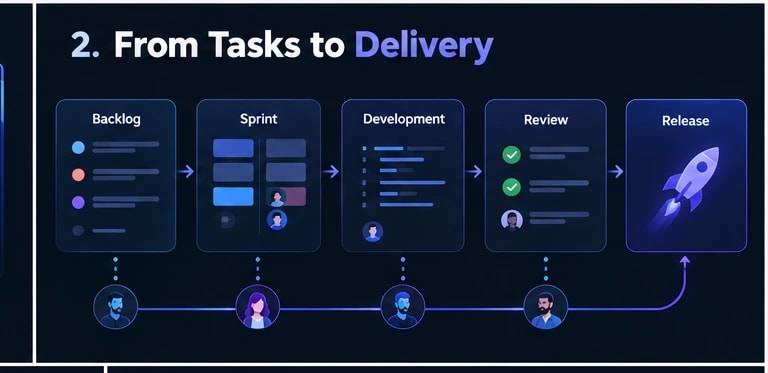
Generic project management software was never a great fit for software development teams, and in 2027 there is little reason to settle for it. The best project and task management tools built specifically for engineering workflows connect directly to your version control system, surface work item status from actual code activity rather than manual updates, and give engineering managers visibility into cycle time, blocked tasks, and sprint health without requiring developers to spend twenty minutes a day updating ticket statuses.
The most effective tools in this category treat the developer as the primary user, not the project manager. That means tight integration with Git, automated status transitions based on branch activity or pull request merges, and clean interfaces that do not punish you for spending most of your time in the terminal or the IDE. When a developer opens a ticket, they should be able to see linked PRs, related documentation, and relevant CI run results without jumping between five different browser tabs.
For SaaS development teams and product-led companies, sprint planning features that connect roadmap priorities to actual engineering capacity are especially valuable. Tools that can model technical debt as a first-class work item, alongside feature development, help engineering leads have more honest conversations with product stakeholders about what is actually possible in a given cycle.
The most important thing to look for is bi-directional sync between your task management tool and your version control and deployment pipeline. One-way integrations that require manual reconciliation between systems are a consistent source of frustration and inaccurate project data. True bi-directional sync means your project board reflects reality automatically, which is the entire point.
Code Review and Collaboration Tools That Speed Up Shipping
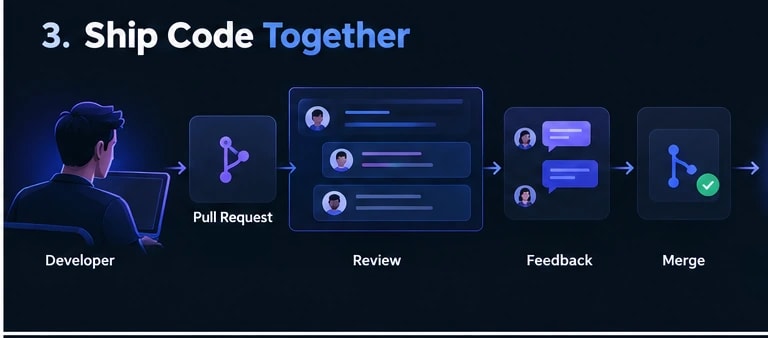
Code review is one of the most important and most consistently underestimated bottlenecks in a software development workflow. When pull requests sit open for days waiting for review, or when reviews are rushed and superficial because reviewers are overloaded, the whole team pays the cost in delayed releases and production issues. The right tooling does not replace good engineering culture around code review, but it removes a significant amount of friction from the process.
In 2027, the best code review tools do several things that were not standard a few years ago. They provide AI-assisted review suggestions that catch common issues, style inconsistencies, and potential bugs before a human reviewer even opens the PR. They also provide smart reviewer assignment based on code ownership, recent familiarity with the changed files, and current reviewer workload, so you are not always defaulting to the same two senior engineers for every review.
Inline discussion quality has also improved. Modern review tools support threaded conversations with rich context, code suggestions that reviewers can push directly without leaving the review interface, and clear resolution tracking so nothing gets lost in a long comment thread. For teams shipping frequently, the ability to batch small reviews and handle them asynchronously without losing context is a meaningful time-saver across the course of a week.
For distributed teams, the async-first design of newer review tools is particularly valuable. Review request timing, reminder workflows, and escalation paths for stale reviews can be configured to match your team’s working hours across time zones, reducing the situation where a PR is blocked simply because the right reviewer is in a different country and asleep. Faster reviews mean faster shipping, and faster shipping means faster feedback from real users, which is ultimately what drives better software.
Local Development and Environment Management Tools Worth Using in 2027
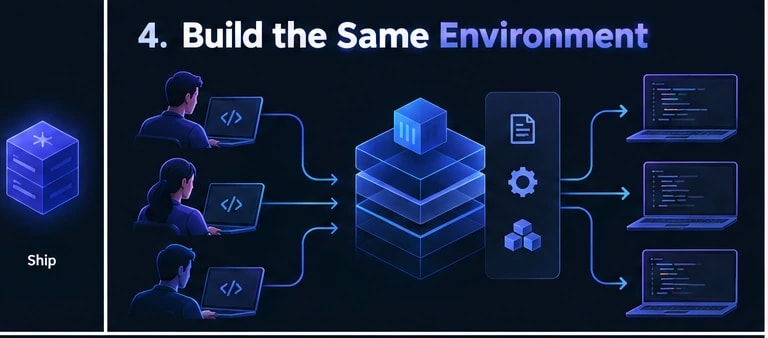
One of the quietest productivity killers in software development is environment inconsistency. A bug that only shows up on one machine, a dependency conflict that blocks onboarding, or a configuration mismatch between local and production, these problems eat hours that teams rarely account for. In 2027, a new generation of environment management tools has made these frustrations significantly easier to handle.
The biggest shift has been toward containerized and reproducible development environments that spin up in minutes, not hours. Tools in this category give every developer on the team an identical working environment regardless of their operating system or hardware, which dramatically reduces the “works on my machine” problem that has plagued teams for decades.
Here are the capabilities that matter most when evaluating local development and environment tools right now:
- Instant environment provisioning: The best tools create fully configured dev environments from a single config file, pulling in the right language versions, dependencies, and services automatically.
- Cloud-backed development options: Remote dev environments hosted in the cloud let developers work from any device without sacrificing performance or consistency.
- Environment snapshots and rollback: Being able to snapshot a working environment and roll back to it after a bad dependency update saves significant debugging time.
- Integrated secret management: Tools that handle environment variables and secrets securely within the dev workflow remove a major security risk and reduce setup complexity.
- Fast rebuild times: Incremental builds and intelligent caching mean environments rebuild quickly even after major dependency changes.
| Tool Type | Best For | Key Benefit | Typical Use Case |
|---|---|---|---|
| Containerized Local Environments | Teams needing consistency across machines | Eliminates environment drift | Microservices, multi-service apps |
| Cloud Dev Environments | Remote and distributed teams | Device-agnostic development | Large codebases, global teams |
| Version Managers | Solo developers and small teams | Easy language version switching | Projects with multiple runtime needs |
| Infrastructure as Code Dev Tools | DevOps-heavy teams | Local infra mirrors production exactly | Cloud-native and serverless projects |
For teams building SaaS products or scaling web applications, investing in proper environment tooling early pays back quickly. Faster onboarding, fewer environment-related bugs, and cleaner parity between local and production environments all contribute to shipping with more confidence.
Monitoring, Debugging, and Observability Tools That Save Hours in Production
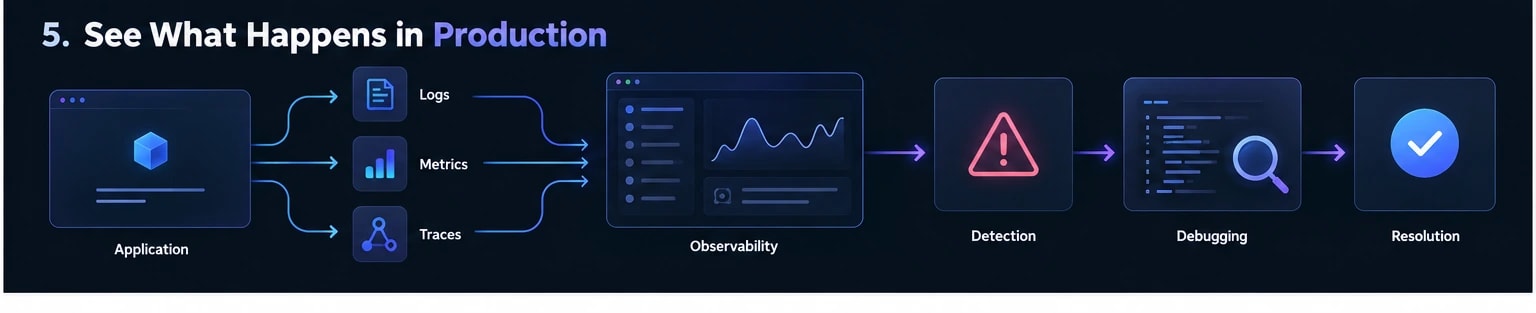
Building software is only half the job. Once your application is live, knowing what is happening inside it at any given moment is what separates teams that fix problems in minutes from teams that spend days chasing down vague user complaints. In 2027, observability tooling has become one of the most important categories in any developer’s toolkit.
The term “observability” covers three core pillars: logs, metrics, and traces. Modern tools bring all three together in unified platforms that let developers jump from a high-level performance alert directly into the specific function call or database query that caused the problem. This kind of connected visibility is a huge time saver when production incidents happen.
What to look for in observability and debugging tools today:
- Distributed tracing: The ability to follow a single request across multiple services or microservices is critical for diagnosing latency and failure points in complex architectures.
- Real-time alerting with intelligent noise reduction: Alert fatigue is real. The best tools use AI-assisted filtering to surface only the alerts that actually need attention, grouped by likely root cause.
- Session replay and frontend error tracking: For web applications, tools that capture exactly what a user was doing when an error occurred reduce the investigation cycle from hours to minutes.
- Performance profiling: Continuous profiling tools identify slow code paths in production without requiring manual instrumentation or disrupting live traffic.
- Log aggregation and search: Fast, structured log search that can handle high volumes of data without becoming expensive or slow is still one of the most practically useful capabilities in this category.
- Deployment correlation: Tools that automatically correlate error spikes with recent deployments make it much faster to confirm whether a new release caused a regression.
For any team running production workloads, skipping proper observability tooling is a false economy. The hours saved during the first serious incident will more than justify the cost of setting these systems up correctly from the start. Custom software projects in particular benefit from observability being built in from day one rather than added after problems appear.
| Observability Area | What It Tells You | Primary Benefit |
|---|---|---|
| Distributed Tracing | Where requests slow down or fail across services | Faster root cause identification |
| Log Aggregation | What your application recorded at any point in time | Audit trails and error investigation |
| Metrics and Dashboards | System health trends over time | Proactive capacity and performance planning |
| Frontend Error Tracking | What users experience when things break | Faster bug reproduction and resolution |
| Continuous Profiling | Which code paths consume the most resources | Performance optimization without guesswork |
Conclusion
The best software development productivity tools in 2027 share a common thread: they reduce friction at the exact points where developer time gets wasted most. From AI coding assistants that cut boilerplate and catch bugs before review, to observability platforms that turn production incidents from all-day investigations into quick fixes, the tools covered in this guide address real pain points across the full development lifecycle. The key is not adopting every tool available but choosing the ones that match your team’s size, workflow, and the specific bottlenecks slowing you down the most.
If you are building a SaaS product, a web application, or a custom software solution and want to make sure your development setup is actually supporting your team’s speed rather than getting in the way, this is a conversation worth having early. Techlad works with startups and growing businesses to build scalable software with the right tooling baked in from the beginning. Getting the foundation right from day one makes everything that follows faster, more reliable, and easier to maintain as your product grows.
Frequently Asked Questions
What is the single most impactful productivity tool for developers in 2027?
AI-powered coding assistants have had the biggest measurable impact on individual developer output. They reduce time spent on boilerplate code, speed up debugging, and assist with documentation. For team-level productivity, pairing a solid AI assistant with a purpose-built engineering project management tool tends to deliver the strongest combined results.
How do I know which development tools are right for my team’s size?
Smaller teams benefit most from lightweight, integrated tools that reduce setup overhead, while larger teams need tools with strong access controls, audit trails, and integration capabilities. Start by identifying your biggest bottleneck, whether that is onboarding, code review speed, or production visibility, and choose tools that solve that specific problem first.
Are cloud-based development environments secure enough for production codebases?
Yes, when configured correctly. Leading cloud development environment platforms offer encryption at rest and in transit, role-based access controls, and audit logging. The key is ensuring your secret management practices are solid and that access is tied to your organisation’s identity provider rather than individual credentials.
What is the difference between monitoring and observability?
Monitoring tells you when something is wrong using predefined metrics and alerts. Observability goes further, letting you explore unknown problems by querying logs, traces, and metrics together. In practice, observability tools give you the ability to ask new questions about your system’s behaviour without needing to instrument it in advance.
How much should a software team budget for productivity tooling?
There is no universal figure, but most engineering teams find that spending between 5 and 15 percent of their total engineering payroll on tooling delivers a strong return. The calculation is straightforward: if better tools save each developer even a few hours per week, the cost of those tools is typically recovered within the first month of use.